Color Science
vision
This seminar conducted by color scientist Peter Postma a contributor to ACES - offers an incredible overview of how light is measured and displayed digitally.
Color Science for VFX
Color is not a file format, a LUT, or a “look.” It is light, filtered by human vision, measured into numbers, carried through cameras and software that each speak a different dialect, and finally forced onto a display that can only show a triangle of colors inside a larger world of what people can see.
If you only remember one sentence for the career:
“Red” is not a wavelength on disk — it is a managed claim about how light should look to a human, on a given device, under a given transform.
This lesson builds that idea from vision → CIE measurement → gamuts → why we need color management (IDT / working space / ODT) → why cameras encode log → information theory and bits.
What is color, physically?
Visible light is a thin band of the electromagnetic spectrum — roughly 380–700 nm for human vision. Longer wavelengths trend “red”; shorter trend “violet.” Sunlight, tungsten, LEDs, and RGB pixels are different spectra (power vs wavelength).
A camera does not store spectra. Neither does your eye. Both collapse a continuous spectrum into a few channel responses:
System | How it samples light |
|---|---|
Human eye | Three cone types (L, M, S) with broad, overlapping sensitivity |
Cinema camera | Usually Bayer RGB filters + spectral curves of the sensor |
Display | Three (or more) primaries mixed to stimulate the eye |
Two different spectra can look the same to a person (metamerism). That is why “matching the plate” is about perceived color under a pipeline, not about identical physics everywhere.
What is “red,” really?
People use “red” in at least four incompatible ways:
- Physics — long-wavelength light (e.g. ~650 nm laser).
- Sensation — “this looks red to me,” under some adaptation (daylight vs tungsten).
- RGB code — e.g.
(1, 0, 0)in some color space. - Marketing / UI — the pure corner of a triangle on a chart.
Only (3) is what lives in EXRs, ProRes, and Nuke — and (1, 0, 0) without a color space is meaningless.
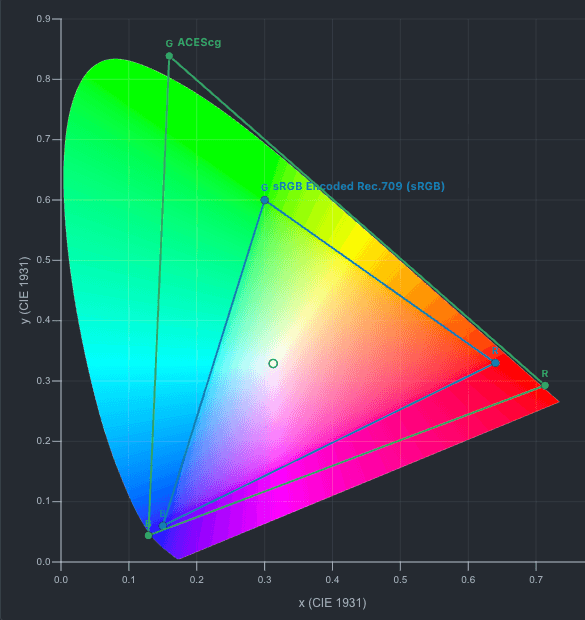
(1, 0, 0)in sRGB / Rec.709 is one red primary on the CIE chart.(1, 0, 0)in ACEScg is a different chromaticity — much “wider.”(1, 0, 0)in camera log is not linear scene red; it is a code value after a log curve and a camera matrix.
So “red” on a timeline is always:
code values + color space / encoding + view transform
Manage any of those wrong and “red” becomes pink, orange, crushed, or illegal on the client monitor.
Why it needs to be managed
Without management you get:
- Wrong primaries — treating Alexa footage as Rec.709 → hues shift.
- Wrong transfer function — treating log as display gamma → milky or crushed image.
- Wrong white — D60 working space shown as D65 without adaptation → overall cast.
- Clipping — pushing wide camera colors through a small display gamut without a proper render transform → neon edges, hue twists, lost highlight detail.
Color management is the discipline of labeling every image with what the numbers mean and transforming when you change meaning (camera → scene-linear → display).
How we measure color: CIE 1931
In 1931 the CIE formalized how a “standard observer” matches lights using three imaginary primaries X, Y, Z. That gave:
- A way to assign numbers to perceived colors (independent of any one camera).
- The famous chromaticity diagram: project XYZ to xy so you can plot hue/saturation-like position without luminance.
x = X / (X + Y + Z)
y = Y / (X + Y + Z)- Y carries luminance-like information.
- xy is the 2D “horseshoe” chart: the curved edge is the spectral locus (pure monochromatic lights). The straight base is the line of purples (mixes of extreme red + violet, not single wavelengths).
Reading the CIE 1931 chart (use the block)
Feature | Meaning |
|---|---|
Horseshoe boundary | Limits of human chromaticity for the 2° standard observer |
Inside the horseshoe | Real, mixable colors (desaturated toward white) |
White point (e.g. D65) | “Neutral” for a given illuminant / display |
RGB triangle | All colors makeable by mixing three primaries of that space |
Outside a triangle but inside the horseshoe | Visible to humans, not reproducible by that RGB system |
No three-primary RGB display or camera encoding can cover the entire horseshoe. That gap is why we talk about gamut, volume, and rendering intents.
CIE 1931 chromaticity diagram
Horseshoe = all chromaticities a standard observer can see. Triangles = colors an RGB system can make from its three primaries. Scroll to zoom, drag to pan.
sRGB / Rec.709
Display P3
Rec.2020
ACEScg (AP1)
Human vision (why green, why log-ish perception)
Cones and luminance
The eye is not equally sensitive across the spectrum. Luminance for video is dominated by a green-weighted mix (classic Rec.709-ish):
Y ≈ 0.2126·R + 0.7152·G + 0.0722·B(in a linearized Rec.709-related RGB). That is why green carries most of the “detail/brightness” story and why chroma subsampling can get away with throwing away color resolution.
Perception is compressive
Physical light can span many orders of magnitude (starlight → sun). Subjective brightness is roughly logarithmic / power-law, not linear. Weber–Fechner-style: equal ratios of light feel more like equal steps than equal adds.
Displays and cameras exploit that:
- Scene-linear floating point (EXR) stores physical-ish proportions for lighting math.
- Gamma / PQ / HLG / log reshape values so limited bit depths put more codes where the eye notices change.
That is the bridge to why cameras encode log (below).
Adaptation
Your brain white-balances continuously. A grey card under tungsten “looks white” after a minute; a raw file does not adapt for you. Pipelines must choose a creative white and stick to it through grades and CG.
Gamut: the triangle is not the world
A color gamut is the set of colors a device or encoding can represent.
Space | Rough role |
|---|---|
sRGB / Rec.709 | Legacy web + HD broadcast triangle (small) |
Display P3 | Wider modern displays / phones |
Rec.2020 | UHDTV container; most real TVs can’t fill it yet |
ACEScg (AP1) | Common VFX working RGB (wide, scene-referred) |
ACES2065-1 (AP0) | Archival ACES RGB (extremely wide; almost “all of CIE”) |
Key VFX fact: plates often contain camera colors outside Rec.709. If you prematurely convert to 709 and clip, you throw away information you needed for a show LUT, HDR grade, or matching CG.
On the CIE chart: camera / ACES triangles sit outside the 709 triangle. Color management’s job is to carry those values safely until an output transform decides how to fit them onto a real monitor.
The pipeline: IDT → working space → ODT (and friends)
Color management is a chain of named transforms. OCIO / ACES language:
Term | Meaning |
|---|---|
IDT (Input Device Transform) | Camera / plate encoding → scene-referred working space |
Working space | Where lighting, CG, and most grades should happen (often linear ACEScg or similar) |
ODT (Output Device Transform) | Working space → display / deliverable (Rec.709, P3-D65, HDR10, …) |
RRT (Reference Rendering Transform, ACES) | Scene → display-referred “look foundation” before a display ODT (ACES 1.0 classic architecture) |
View transform | What you see in the viewer (often a preview ODT + look) |
Display | The actual device calibration target |
Mental model
Camera log / RAW  --IDT-->  Scene-linear working RGB  --creative grade / CG-->  same working space
                                      |
                                    ODT / view
                                      v
Client monitor / deliverable- IDT answers: “These code values came from this camera encoding; make them mean scene light.”
- ODT answers: “These scene values should look correct on this display under this standard.”
Skip either end and you are guessing. Comp “fixing” saturation on log without an IDT is cargo-cult color.
Why both ends matter
Mistake | Symptom |
|---|---|
No IDT (log treated as linear or as 709) | Wrong contrast, hue errors, CG never matches |
No ODT (linear dumped to sRGB) | Dark, flat, or wildly over-bright; “why does my EXR look wrong in Finder?” |
IDT of camera A on footage from B | Systematic hue/sat error |
ODT for P3 while client is 709 | Looks great at home, wrong in the suite |
Rule: every image in the script should have a known role (input encoding, working, display). OCIO configs exist so you stop inventing that map per shot.
Why cameras encode log
Sensors measure light in a way that is approximately linear with exposure (within their range). Files do not usually ship pure linear 16-bit integer for every production codec.
The problem log solves
- Dynamic range — modern sensors capture many stops of highlight and shadow.
- Limited code values — 10-bit, 12-bit integer codecs have a fixed set of levels.
- Human vision — you need finer steps in midtones than in the extreme highlights (information where perception cares).
- Highlight protection — a pure linear encoding wastes codes on brights the grade will compress, and runs out of codes in the mids.
Log curves (LogC, S-Log3, REDLog3G10, V-Log, …) apply a compressive transfer function so that:
- Each stop of light maps to a more even slice of code values.
- Mid-grey sits at a defined code (e.g. ~0.38–0.45 depending on the curve).
- Highlights roll gently instead of hard-clipping as fast as pure gamma 2.2 would.
That is not a look. It is a container encoding optimized for transport and bit depth. The “look” comes later (show LUT, grade, ODT).
Relation to human vision and information theory
Think in bits as budget:
- Scene dynamic range might span 14+ stops of useful signal.
- A 10-bit signal has 1024 levels per channel (fewer after legal range / headroom).
- If you allocate codes linearly in light, most codes go to the top stops; shadows posterize.
- If you allocate codes roughly evenly per stop (log), you match the eye’s roughly constant sensitivity to relative change and preserve grade-ability.
Same idea as floating-point EXR for CG: scene-linear float has huge range with fine relative precision. Log integer is a compressed compromise for cameras and editorial codecs when float RAW pipelines are not the deliverable.
Encoding | Good for | Bad if you… |
|---|---|---|
Scene-linear float (EXR) | Lighting, CG, merges, science | Dump raw to sRGB viewer without a view transform |
Camera log (integer) | On-set / editorial range, 10-bit media | Grade as if it were display-referred |
Display gamma / PQ | Final view, streaming masters | Use as a lighting workspace |
IDT undoes camera log (and applies the camera’s color matrix) into working linear. ODT applies the display curve and gamut map so the viewer is not looking at linear data.
Gamma, “linear,” and what Nuke is doing
- Linear (scene-referred): doubling RGB ≈ doubling light. Math for exposure, blur of light, physical CG.
- Display-referred gamma: codes already shaped for a monitor; “0.18” is not 18% grey in scene terms without a transform.
- Log: intermediate encoding; do math carefully (often convert to linear first for merges that should be physical).
Classic mistake: grade and key log footage as if mid-grey were display mid-grey. Use the viewer process (OCIO view) so your eyes see an ODT’d image while the script stays correctly labeled.
LUTs and 3D LUTs
A LUT is a sampled function: input RGB → output RGB.
- 1D LUT — per-channel curve (exposure-ish, contrast, log↔lin approximations).
- 3D LUT — full 3D lattice; can do gamut maps, looks, print emulations.
In modern pipelines, many “LUTs” are baked views of IDT/ODT/look chains. Prefer OCIO built in named transforms when you can; use LUTs when the show delivers them as the contract.
LUTs are not magic color science — they are tables. Wrong input space → garbage output.
Perception vs measurement (still)
Your brain:
- Adapts white balance
- Judges color relative to neighbors (simultaneous contrast)
- Accepts crushed blacks in a dark suite that look wrong on a bright laptop
So:
- Configure the display the align with the ODT.
- Grade under controlled light.
- Trust scopes + stills under the same view transform the client uses.
ACES / OCIO in one page
ACES (Academy Color Encoding System) is a standardized family of spaces and transforms so facilities can share work without “what gamma is this EXR?”
- ACES2065-1 — wide archival RGB (AP0).
- ACEScg — common CG/comp working space (AP1, linear).
- IDTs / ODTs — published mappings for cameras and displays (via OCIO configs on real shows).
OCIO (OpenColorIO) is the engine shows use to apply those transforms consistently in Nuke, Maya, Houdini, Blender, etc.
You do not need to memorize every ACES version. You need to:
- Know input encoding of every plate.
- Work in a linear scene space agreed by the show.
- View through the show’s view transform.
- Deliver through the correct ODT / output path.
Practical VFX checklist
- Label every input — camera + log curve + gamut (or RAW + IDT name).
- IDT into working space before hero lighting/CG/merges that assume linear light.
- CG renders in the same working space as comp (or with an explicit convert).
- Viewer = show OCIO config; do not “fix” look by turning OCIO off.
- ODT only at the edges — client monitors, QT exports, deliverables — not randomly mid-script.
- Gamut — expect camera colors outside 709; don’t clip early. Use the CIE chart block to see how small 709 is.
- Bits — prefer half/float EXR
- “Red” — always means “red in this space, viewed this way.”
Quick reference
Idea | One-liner |
|---|---|
Color | Spectra collapsed by eye/camera into a few channels |
“Red” | Code values + color space + view — not a free-floating hue |
CIE 1931 xy | Map of human chromaticities; horseshoe = vision, triangle = RGB gamut |
Gamut | Colors a device/encoding can make; none cover all of vision |
IDT | Camera encoding → scene working space |
ODT | Working space → display / deliverable |
Log | Compressive encoding so limited bits cover many stops of light |
Linear | Proportional to light; correct workspace for physical math |
Why manage color | Different devices, encodings, and gamuts must agree on meaning |
Information | Log / perceptual curves spend bits where the eye notices error |
Summary
- What is red? A managed relationship between light, three-channel encoding, and a view transform — not a single number in a file.
- Why manage it? Cameras, CG, and displays disagree on primaries, white, and curves; unmanaged pipelines invent errors.
- CIE 1931 gives a shared map of human chromaticity; RGB systems are triangles inside that map — use the CIE 1931 Chart block to see it.
- IDT brings plates into a scene-referred workspace; ODT takes finished work to a real display.
- Cameras encode log to pack wide dynamic range into limited integer code values in a way that respects roughly logarithmic vision — it is an information-budget choice, not a grade.
- Work linear for light math; view through the show’s transform; never confuse log code values with display appearance.
CIE 1931 chromaticity diagram
Horseshoe = all chromaticities a standard observer can see. Triangles = colors an RGB system can make from its three primaries. Scroll to zoom, drag to pan.
sRGB / Rec.709
Display P3
Rec.2020