Playback Tools for VFX
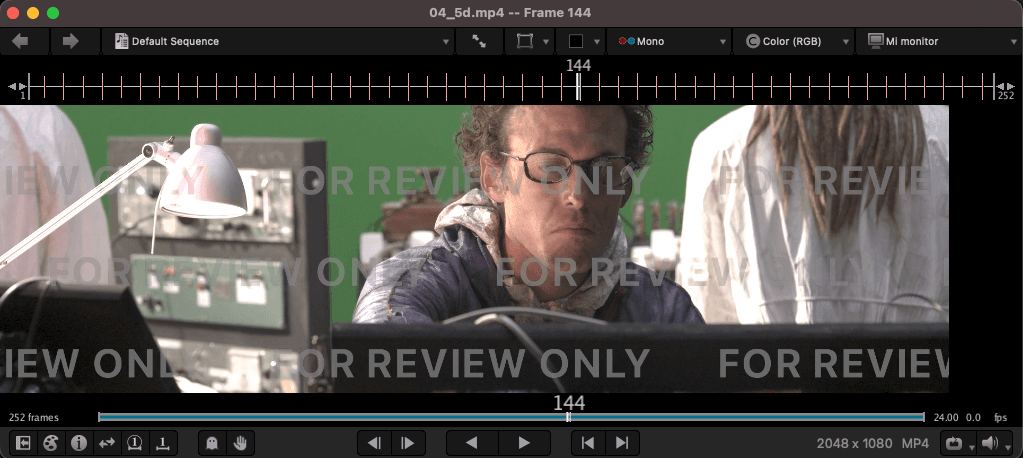
You need a player that can scrub image sequences (EXR, DPX) and movie proxies at speed, with color management you trust. Nuke’s viewer is fine while you work. For dailies, version flips, and “does this actually play,” people reach for dedicated playback.
Color-managed review only works if you know what the numbers mean — see Color Science for OCIO / display transforms, and Tech Check for the pre-delivery pass that catches pipeline failures before a supervisor does. Interactive checklist: /tech-check.
Below are the tools you will actually see in VFX and post.
RV / Open RV
The industry default review player for many studios. Fast sequence playback, A/B compare, annotations, playlists, OCIO-friendly viewing. Originally Tweak Software; now Autodesk. Won a Sci-Tech award for a reason.
Open RV is the open-source build (Academy Software Foundation). Good enough for most artist review. Commercial RV still has a wider format/codec matrix and support.
Prebuilt Open RV
Building from source is heavy. Prebuilt Linux / macOS ARM64 / Windows packages (CY2025 Release). Asset names are stable, so these always resolve to the latest release:
Platform | Download |
|---|---|
Linux x86_64 | |
macOS ARM64 | |
Windows x86_64 |
Gatekeeper often blocks downloaded builds:
(Change the path if your build is not in /Applications.)
xSTUDIO
DNEG’s high-performance playback and review app, open-sourced under the ASWF (github.com/AcademySoftwareFoundation/xstudio). Built for facility review — workstations through screening rooms — with inspection tools and pipeline APIs (C++ / Python).
Main open alternative to RV when you want something designed and used at large VFX scale.
More: dneg.com — xSTUDIO
DJV
Free, open-source media player aimed at VFX image sequences (DJV site, GitHub). Plays high-res, high-bit-depth sequences and movies in real time: A/B compare, OCIO, timeline support (OTIO), multi-track audio. Lightweight install, no studio license.
Good default when you need “open EXRs and flip” without building Open RV or wiring xSTUDIO. For multi-channel EXR / AOV inspection context, see Render AOVs.
Hiero / HieroPlayer & Foundry Flipbook
Foundry’s editorial and review stack sits next to Nuke, not instead of a dedicated facility player.
Hiero is the timeline tool: conform plates and versions, soft effects, retimes, exports, and shot structure for VFX editorial. HieroPlayer is the lighter playback / review app in the same family — often what artists actually flip versions in day to day. A Nuke license typically includes HieroPlayer; full Hiero is the editorial seat.
Flipbook (Nuke → Flipbook) is the in-comp “send this write / this node to a player” path. Modern Nuke can use HieroPlayer as Flipbook: OCIO config and viewer colorspace from the script follow into the review session, so you are not re-setting color every time you F12 a render. Set HieroPlayer as Flipbook in the UI or Preferences when you want that workflow.
Use this stack when you already live in Foundry tools and need timeline context or a one-click flip from the node graph. For pure high-speed sequence review outside editorial, studios still lean on RV, xSTUDIO, DJV, or Chaos Player.
Chaos Player
Chaos Player is Chaos’s professional image-sequence player — the successor to Pdplayer (Asynthetic). Common in V-Ray / Chaos shops and anywhere people want fast EXR flip, multi-layer stacks, and light composite / grade while playback keeps running.
Expect: smart cache for new and updated frames, multi-layer sequences, A/B (and multi-version) compare, contact sheets, OCIO / HDR viewing, annotations, export to movie or stills, and solid command-line hooks for pipeline. Not a full DI suite — a render → review tool with enough layering to tech-check AOVs and versions without opening Nuke for every pass.
Good when: “the farm just wrote frames and I need to see them now,” or you want a commercial sequence player that is not RV.
VLC
VLC is the universal free movie player. Everyone has it. Great for H.264 / ProRes / QuickTime proxies, client deliveries, and “does this file open on a random laptop?”
It is not a VFX sequence player: weak or no EXR/DPX flipbook workflow, no serious OCIO review stack, not built for frame-accurate dailies the way RV / DJV / xSTUDIO / Chaos Player are. Use it for movies and encoded previews — not as your only EXR review tool.
Camera manufacturer players (proprietary codecs)
Facility players (RV, DJV, …) are for VFX deliverables — usually EXR sequences and movie proxies. Camera vendors ship a different class of tool: debayer / develop / transcode apps for their own RAW containers. You use these when plates are still camera original, before (or while) the show turns them into working EXRs.
These are not a substitute for daily VFX review. They are the reference path when someone says “open the R3Ds / ARRIRAW / X-OCN and check the metadata / ISO / white balance.”
Vendor | Codec / media | Official tool | Role |
|---|---|---|---|
RED | R3D (REDCODE RAW) | REDCINE-X PRO (+ RED Player in the package) | Primary R3D viewer, grade, timeline, and transcode. RED Player is the lighter built-in player; REDCINE-X is the full pre-editorial suite. Also REDline CLI. |
ARRI | ARRIRAW / MXF ARRIRAW | Current reference for view, render, looks, metadata. Older ARRIRAW Converter (ARC) is legacy. | |
Sony | Sony RAW / X-OCN (VENICE, BURANO, AXS-R…) | RAW Viewer for X-OCN / Sony RAW check and export; Catalyst for broader Sony pro formats, logging, and media management. | |
Blackmagic | BRAW | DaVinci Resolve (and free Blackmagic RAW Player where shipped) | Resolve is the first-class BRAW home; BMD does not need a separate “cinema suite” the way RED does. |
Canon | Cinema RAW / Cinema RAW Light | Develop, play, and export Canon cinema RAW. NLEs also ship Canon RAW plugins (e.g. FCP, Avid). | |
Apple | ProRes RAW | Final Cut Pro (and supported hosts with Apple’s codec stack) | No standalone “ProRes RAW Player” the way RED has RED Player — playback lives in FCP / NLE / OEM plugins. Common from Atomos external recorders as well as camera-native. |
Vision Research | Cine (Phantom high-speed) | Phantom Camera Control / Phantom Video Player | High-speed cine files; more specialty / FX / science than daily drama plates. |
Also in the ecosystem (not always a free desktop player of their own):
- GoPro CineForm — intermediate codec; historically CineForm Studio / VLC plugin; now open-source SDK and wide NLE encode/decode support.
- Codex / HDE — ARRIRAW and other high-end media often ride Codex hardware and wrappers; playback still goes through ART / facility tools, not a consumer flipbook.
- NLE plugins — almost every vendor also ships AMA / OFX / FCP plugins so Premiere, Avid, Resolve, and FCP can open camera original without the manufacturer app. The free vendor app remains the reference when the NLE debayer disagrees with what the camera team expects.
Rule of thumb for comps: you rarely review final VFX versions in REDCINE-X or ART. You do open those tools (or ask editorial / DIT) when the plate is still camera RAW, when ISO/WB/look metadata matters, or when you need a ground-truth transcode before EXR delivery into the VFX pipeline. Once you are in EXR sequences, go back to RV / xSTUDIO / DJV / Chaos Player / HieroPlayer.
What to use when
Need | Use |
|---|---|
Studio-standard sequence review | RV / Open RV |
Open facility-grade player | xSTUDIO |
Free EXR flipbook, simple install | DJV (or mrv2) |
In-Nuke flip / Foundry timeline review | HieroPlayer + Flipbook (full Hiero for editorial) |
Fast commercial sequence player (Pdplayer lineage) | Chaos Player |
Encoded movies / “just open the file” | VLC |
Rule of thumb: review EXRs in a color-managed sequence player (RV, xSTUDIO, DJV, Chaos Player, HieroPlayer). Use VLC for proxies and deliveries. Expect finals and client sign-off to involve a grading system like Baselight or Resolve — not only a flipbook.
When the version plays cleanly, run a Tech Check before you call the shot done — range, blacks, grain, edge quality, and the rest of the pre-delivery list. Interactive version: /tech-check.